
Hourly Usage
Performance Metrics
Typical Total Time
7.38s
Typical TTFT
10.38s
Typical Input TPS
803.92
Typical Output TPS
14.67
Model Information
Context Size
262144
Quantization
r128 on INT8
Engine
vllm
Creation Method
Finetune
Model Type
Gemma31B
Chat Template
Gemma4
Reasoning
Yes
Vision
Yes
Parameters
31B
Added At
7/25/2026
base_model: unsloth/gemma-4-31B-it tags:
- text-generation-inference
- transformers
- unsloth
- gemma4
- reasoning license: apache-2.0 datasets:
- TeichAI/Claude-Opus-4.6-Reasoning-887x
- TeichAI/claude-4.5-opus-high-reasoning-250x
- Crownelius/Opus-4.6-Reasoning-2100x-formatted
🌟 Gemma 4 - 31B x Claude Opus 4.6 v2
Build Environment & Features:
- Fine-tuning Framework: Unsloth
- Reasoning Effort: High
- This model bridges the gap between Google's exceptional open-weights architecture and Claude 4.6's profound reasoning capabilities, leveraging cutting-edge fine-tuning environments.
💡 Model Introduction
Gemma 4 - 31B x Claude Opus 4.6 is a highly capable model fine-tuned on top of the powerful unsloth/gemma-4-31B-it architecture. The model's core directive is to absorb state-of-the-art reasoning distillation, primarily sourced from Claude-4.6 Opus interactions.
By utilizing datasets where the reasoning effort was explicitly set to High, this model excels in breaking down complex problems and delivering precise, nuanced solutions across a variety of demanding domains.
🗺️ Training Pipeline Overview
Base Model (unsloth/gemma-4-31B-it)
 │
 ▼
Supervised Fine-Tuning (SFT) + High-Effort Reasoning Datasets
 │
 ▼
Final Model (Gemma 4 - 31B x Claude Opus 4.6)
📋 Stage Details & Benchmarks
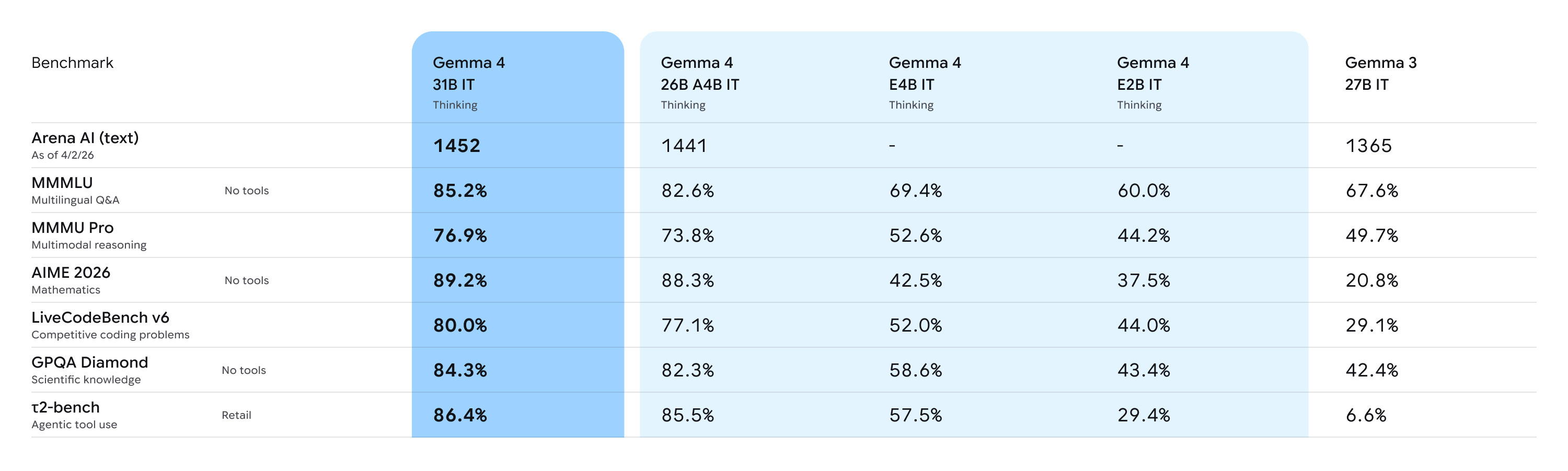
Benchmarks coming soon
Performance vs Size:
Deep Dive Analysis: For more comprehensive insights regarding the base capabilities of the Gemma 4 architecture, please refer to this Analysis Document.
🔹 Supervised Fine-Tuning (Meeting Claude)
- Objective: To inject high-density reasoning logic and establish a strict format for complex problem-solving.
- Methodology: We utilized Unsloth for highly efficient memory and compute optimization during the fine-tuning process. The model was trained extensively on various reasoning trajectories from Claude Opus 4.6 to adopt a structured and efficient thinking pattern.
📚 All Datasets Used
The dataset consists of high-quality, high-effort reasoning distillation data:
| Dataset Name | Description / Purpose |
|---|---|
TeichAI/Claude-Opus-4.6-Reasoning-887x | Core Claude 4.6 Opus reasoning trajectories. |
TeichAI/claude-4.5-opus-high-reasoning-250x | High-intensity reasoning distillation. |
Crownelius/Opus-4.6-Reasoning-2100x-formatted | Crownelius's extensively formatted Opus reasoning dataset for structural reinforcement. |
🌟 Core Skills & Capabilities
Thanks to its robust base model and high-effort reasoning distillation, this model is highly optimized for the following use cases:
- 💻 Coding: Advanced code generation, debugging, and software architecture planning.
- 🔬 Science: Deep scientific reasoning, hypothesis evaluation, and analytical problem-solving.
- 🔎 Deep Research: Navigating complex, multi-step research queries and synthesizing vast amounts of information.
- 🧠 General Purpose: Highly capable instruction-following for everyday tasks requiring high logical coherence.
Getting Started
You can use all Gemma 4 models with the latest version of Transformers. To get started, install the necessary dependencies in your environment:
pip install -U transformers torch accelerate
Once you have everything installed, you can proceed to load the model with the code below:
from transformers import AutoProcessor, AutoModelForCausalLM

MODEL_ID = "google/gemma-4-31B-it"

# Load model
processor = AutoProcessor.from_pretrained(MODEL_ID)
model = AutoModelForCausalLM.from_pretrained(
    MODEL_ID,
    dtype="auto",
    device_map="auto"
)
Once the model is loaded, you can start generating output:
# Prompt
messages = [
    {"role": "system", "content": "You are a helpful assistant."},
    {"role": "user", "content": "Write a short joke about saving RAM."},
]

# Process input
text = processor.apply_chat_template(
    messages,
    tokenize=False,
    add_generation_prompt=True,
    enable_thinking=False
)
inputs = processor(text=text, return_tensors="pt").to(model.device)
input_len = inputs["input_ids"].shape[-1]

# Generate output
outputs = model.generate(**inputs, max_new_tokens=1024)
response = processor.decode(outputs[0][input_len:], skip_special_tokens=False)

# Parse output
processor.parse_response(response)
To enable reasoning, set enable_thinking=True and the parse_response function will take care of parsing the thinking output.
Below, you will also find snippets for processing audio (E2B and E4B only), images, and video alongside text:
Code for processing Audio
Instead of using AutoModelForCausalLM, you can use AutoModelForMultimodalLM to process audio. To use it, make sure to install the following packages:
pip install -U transformers torch librosa accelerate
You can then load the model with the code below:
from transformers import AutoProcessor, AutoModelForMultimodalLM

MODEL_ID = "google/gemma-4-E2B-it"

# Load model
processor = AutoProcessor.from_pretrained(MODEL_ID)
model = AutoModelForMultimodalLM.from_pretrained(
    MODEL_ID,
    dtype="auto",
    device_map="auto"
)
Once the model is loaded, you can start generating output by directly referencing the audio URL in the prompt:
# Prompt - add audio before text
messages = [
    {
        "role": "user",
        "content": [
            {"type": "audio", "audio": "https://raw.githubusercontent.com/google-gemma/cookbook/refs/heads/main/Demos/sample-data/journal1.wav"},
            {"type": "text", "text": "Transcribe the following speech segment in its original language. Follow these specific instructions for formatting the answer:\n* Only output the transcription, with no newlines.\n* When transcribing numbers, write the digits, i.e. write 1.7 and not one point seven, and write 3 instead of three."},
        ]
    }
]

# Process input
inputs = processor.apply_chat_template(
    messages,
    tokenize=True,
    return_dict=True,
    return_tensors="pt",
    add_generation_prompt=True,
).to(model.device)
input_len = inputs["input_ids"].shape[-1]

# Generate output
outputs = model.generate(**inputs, max_new_tokens=512)
response = processor.decode(outputs[0][input_len:], skip_special_tokens=False)

# Parse output
processor.parse_response(response)
Code for processing Images
Instead of using AutoModelForCausalLM, you can use AutoModelForMultimodalLM to process images. To use it, make sure to install the following packages:
pip install -U transformers torch torchvision accelerate
You can then load the model with the code below:
from transformers import AutoProcessor, AutoModelForMultimodalLM

MODEL_ID = "google/gemma-4-31B-it"

# Load model
processor = AutoProcessor.from_pretrained(MODEL_ID)
model = AutoModelForMultimodalLM.from_pretrained(
    MODEL_ID,
    dtype="auto",
    device_map="auto"
)
Once the model is loaded, you can start generating output by directly referencing the image URL in the prompt:
# Prompt - add image before text
messages = [
    {
        "role": "user", "content": [
            {"type": "image", "url": "https://raw.githubusercontent.com/google-gemma/cookbook/refs/heads/main/Demos/sample-data/GoldenGate.png"},
            {"type": "text", "text": "What is shown in this image?"}
        ]
    }
]

# Process input
inputs = processor.apply_chat_template(
    messages,
    tokenize=True,
    return_dict=True,
    return_tensors="pt",
    add_generation_prompt=True,
).to(model.device)
input_len = inputs["input_ids"].shape[-1]

# Generate output
outputs = model.generate(**inputs, max_new_tokens=512)
response = processor.decode(outputs[0][input_len:], skip_special_tokens=False)

# Parse output
processor.parse_response(response)
Code for processing Videos
Instead of using AutoModelForCausalLM, you can use AutoModelForMultimodalLM to process videos. To use it, make sure to install the following packages:
pip install -U transformers torch torchvision torchcodec librosa accelerate
You can then load the model with the code below:
from transformers import AutoProcessor, AutoModelForMultimodalLM

MODEL_ID = "google/gemma-4-31B-it"

# Load model
processor = AutoProcessor.from_pretrained(MODEL_ID)
model = AutoModelForMultimodalLM.from_pretrained(
    MODEL_ID,
    dtype="auto",
    device_map="auto"
)
Once the model is loaded, you can start generating output by directly referencing the video URL in the prompt:
# Prompt - add video before text
messages = [
    {
        'role': 'user',
        'content': [
            {"type": "video", "video": "https://github.com/bebechien/gemma/raw/refs/heads/main/videos/ForBiggerBlazes.mp4"},
            {'type': 'text', 'text': 'Describe this video.'}
        ]
    }
]

# Process input
inputs = processor.apply_chat_template(
    messages,
    tokenize=True,
    return_dict=True,
    return_tensors="pt",
    add_generation_prompt=True,
).to(model.device)
input_len = inputs["input_ids"].shape[-1]

# Generate output
outputs = model.generate(**inputs, max_new_tokens=512)
response = processor.decode(outputs[0][input_len:], skip_special_tokens=False)

# Parse output
processor.parse_response(response)
Best Practices
For the best performance, use these configurations and best practices:
1. Sampling Parameters
Use the following standardized sampling configuration across all use cases:
temperature=1.0top_p=0.95top_k=64
2. Thinking Mode Configuration
Compared to Gemma 3, the models use standard system, assistant, and user roles. To properly manage the thinking process, use the following control tokens:
- Trigger Thinking: Thinking is enabled by including the
<|think|>token at the start of the system prompt. To disable thinking, remove the token. - Standard Generation: When thinking is enabled, the model will output its internal reasoning followed by the final answer using this structure:
<|channel>thought\n[Internal reasoning]<channel|> - Disabled Thinking Behavior: For all models except for the E2B and E4B variants, if thinking is disabled, the model will still generate the tags but with an empty thought block:
<|channel>thought\n<channel|>[Final answer]
[!Note] Note that many libraries like Transformers and llama.cpp handle the complexities of the chat template for you.
3. Multi-Turn Conversations
- No Thinking Content in History: In multi-turn conversations, the historical model output should only include the final response. Thoughts from previous model turns must not be added before the next user turn begins.
4. Modality order
- For optimal performance with multimodal inputs, place image and/or audio content before the text in your prompt.
5. Variable Image Resolution
Aside from variable aspect ratios, Gemma 4 supports variable image resolution through a configurable visual token budget, which controls how many tokens are used to represent an image. A higher token budget preserves more visual detail at the cost of additional compute, while a lower budget enables faster inference for tasks that don't require fine-grained understanding.
- The supported token budgets are: 70, 140, 280, 560, and 1120.
- Use lower budgets for classification, captioning, or video understanding, where faster inference and processing many frames outweigh fine-grained detail.
- Use higher budgets for tasks like OCR, document parsing, or reading small text.
6. Audio
Use the following prompt structures for audio processing:
- Audio Speech Recognition (ASR)
Transcribe the following speech segment in {LANGUAGE} into {LANGUAGE} text.

Follow these specific instructions for formatting the answer:
* Only output the transcription, with no newlines.
* When transcribing numbers, write the digits, i.e. write 1.7 and not one point seven, and write 3 instead of three.
- Automatic Speech Translation (AST)
Transcribe the following speech segment in {SOURCE_LANGUAGE}, then translate it into {TARGET_LANGUAGE}.
When formatting the answer, first output the transcription in {SOURCE_LANGUAGE}, then one newline, then output the string '{TARGET_LANGUAGE}: ', then the translation in {TARGET_LANGUAGE}.
7. Audio and Video Length
All models support image inputs and can process videos as frames whereas the E2B and E4B models also support audio inputs. Audio supports a maximum length of 30 seconds. Video supports a maximum of 60 seconds assuming the images are processed at one frame per second.
🙏 Acknowledgements
- Google: For providing an exceptional open weights model. Read more about Gemma 4 on the Google Innovation Blog.
- Unsloth: For assembling ready-to-use, cutting-edge fine-tuning environments that make this work possible.
- Crownelius: For creating and sharing his awesome Opus reasoning dataset with the community.
📖 Citation
If you use this model in your research or projects, please cite:
@misc{teichai_gemma4_31b_opus_distilled_v2,
  title        = {Gemma-4-31B-it-Claude-Opus-Distill-v2},
  author       = {TeichAI},
  year         = {2026},
  publisher    = {Hugging Face},
  howpublished = {\url{https://huggingface.co/TeichAI/gemma-4-31B-it-Claude-Opus-Distill-v2}}
}